CompareCompare8 min read
Shopify Markets vs Multiple Stores: How to Sell Abroad
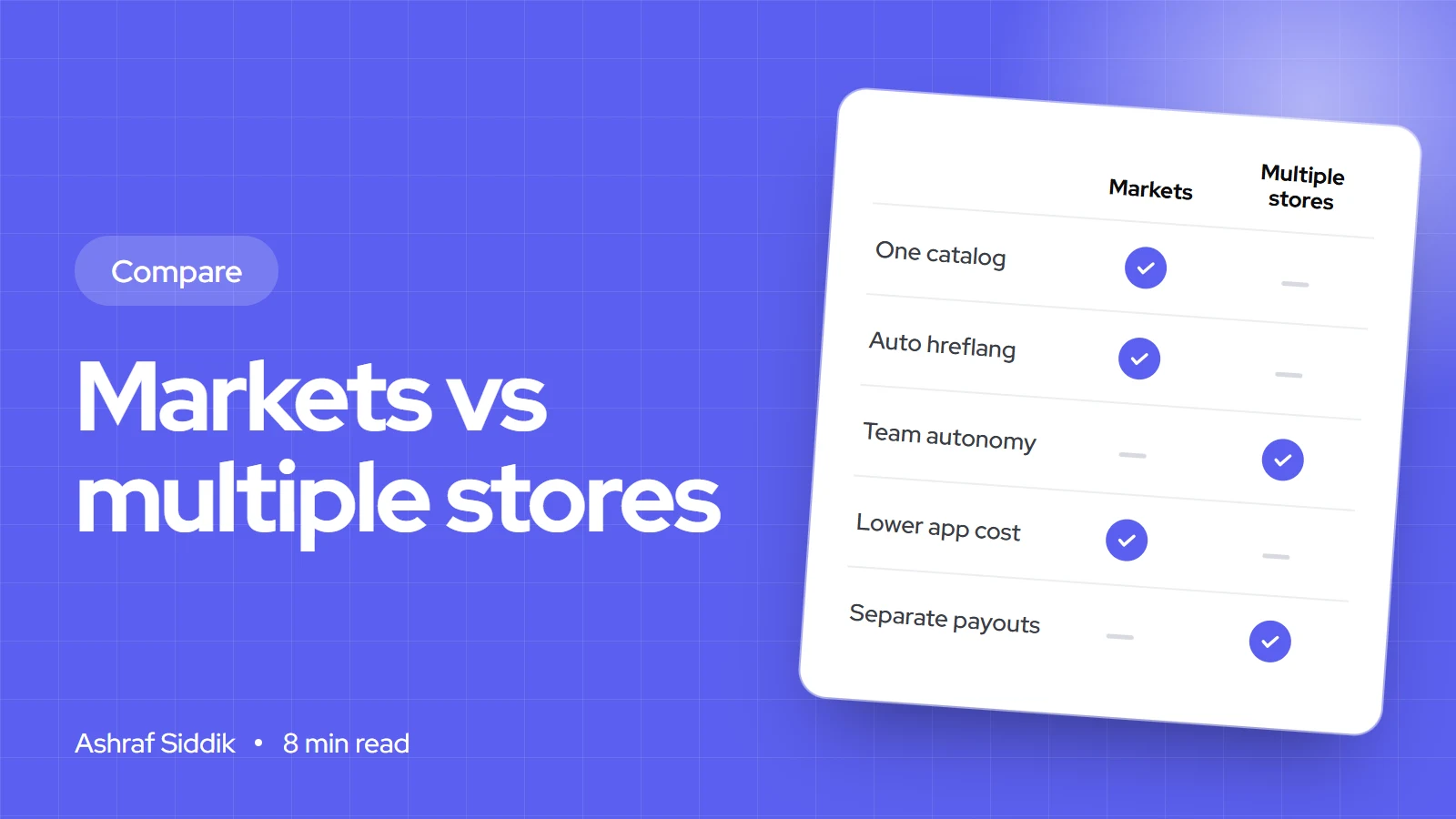
Shopify Markets runs every country from one store. Separate stores give each country full independence, at the cost of more apps, more admin and no built-in sync.
Key takeaways
- Shopify Markets lets one store sell to many countries with local currencies, languages, domains and product ranges. Country markets are on every plan, with no limit on how many you create.
- Separate stores per country give each team full independence, but Shopify doesn't sync products, collections or inventory between them, and apps and theme licences are paid per store.
- Shopify Plus includes up to ten stores on one contract at no extra platform cost, as expansion stores of the same brand. Every store still needs its own apps, theme licence and data.
- My default for most brands is one store with Markets. Separate stores make sense when countries run as separate businesses, with their own teams, entities, stock or very different ranges.
- Who it is for
- Brands selling, or about to sell, in several countries
- Time needed
- 10 minutes to read
- What you need
- Your markets, team setup, stock locations and plan
Shopify Markets vs multiple stores is one of the first decisions a brand faces when it starts selling abroad seriously, and it is expensive to reverse. With Markets, one Shopify store serves every country, adjusting prices, language and products for each. With multiple stores, you run a separate Shopify store per country or region, each with its own admin. I build and fix both setups. I have merged messy multi-store setups into one, and I have also advised brands to split, so this isn't a one-answer question.
Details below come from Shopify's Help Center pages on Markets, international domains and expansion stores, and its UK pricing page, as checked on 7 November 2026.
Shopify Markets vs multiple stores: the short answer
| Your situation | Better fit | Why |
|---|---|---|
| One team, one warehouse or stock pool, selling to several countries | Shopify Markets | One catalog, one stock count, one set of apps |
| Mostly the same products everywhere, with local prices and language | Shopify Markets | Prices, currencies and translations are set per market |
| Local teams that run each country as their own business | Multiple stores | Shopify itself suggests this for dispersed, independent teams |
| Separate legal entities, warehouses and payout currencies per region | Multiple stores, or Markets on Plus | Separate stores keep finances apart; Plus adds business entities to Markets |
| Very different ranges, pricing models or checkout rules per country | Multiple stores | Each store can be configured with no compromise |
What one store with Markets can do
A country or region market controls what a shopper from that place sees: currency, language, product availability and theme customizations. Shopify Markets is available on all plans, with no cap on the number of country or region markets. There are also B2B, retail and channel markets, and sub-region markets in early access.
- Prices. Prices convert automatically by default, or at exchange rates you set. You can round prices per market, adjust them by a percentage, or fix product prices per country through catalogs.
- Domains. Each market can use a country domain such as
example.fr, a subdomain such asfr.example.comor a subfolder such asexample.com/fr-fr. International domains are available from the Basic plan up. - Languages. Translations are set per market, and language-only subfolders such as
/frcan only exist on your primary market. - Payments. Selling in several currencies needs Shopify Payments, and only stores using Shopify Payments with one-page checkout get every local pricing feature.
- Plan limits. Contextual checkout and storefront customization through Markets need Advanced or Plus. Business entities, for selling through different legal entities, need Plus.
What multiple stores means
Outside Plus, multiple stores simply means separate Shopify subscriptions, each with its own plan, apps and admin. On Shopify Plus, extra stores are called expansion stores.
| Expansion stores on Shopify Plus | What Shopify's Help Center says |
|---|---|
| How many | Up to ten stores on one Plus contract at no extra cost. Staging stores don't count |
| More than ten | Contact Shopify Support. An extra fee applies |
| Who qualifies | Extensions of the main brand, with the same store name and branding and the same types of goods |
| Billing currency | Only stores with US or Indian billing can be added to a Plus agreement |
| What's shared | Users and billing are managed centrally |
| What isn't | Each store has its own data and settings. Products, collections and inventory aren't synced |
| Apps and themes | Apps are billed per store. Each store needs its own theme licence |
Product and collection data can be copied when an expansion store is created. After that, every change must be made in each store, or synced with a third-party app or ERP.
Costs: a worked example
Take a UK brand selling to the UK, the EU and the US, with about £150 a month of apps per store, such as reviews, email, filters and subscriptions.
Monthly platform and app cost, UK brand selling to three regions
- One Grow store with Markets£199£49 plan plus £150 apps.
- Three Grow stores£647£147 in plans, £450 apps, £50 for a stock sync app.
- One Plus store with Markets£1,950From £1,800 plus £150 apps.
- Plus with three stores£2,250From £1,800, stores included, £450 apps. Sync not included.
The plan isn't the expensive part of multiple stores. The app bill multiplies, every theme change is done three times, and someone has to keep products, prices and stock consistent. In my experience that staff time costs more than all the subscriptions put together. Plus removes the plan cost of extra stores, but not the app bill or the admin.
SEO and hreflang
With Markets, Shopify creates hreflang and meta tags automatically for every international domain or subfolder you set up. Search engines then show the right country version, and you avoid duplicate content problems between, say, your UK and Irish pages. If you turn this off in Online Store > Preferences, you need to add your own hreflang tags to the theme.
Separate stores don't know about each other. To tell Google that your UK and German stores are versions of the same page, you have to add hreflang links between stores yourself, with an app or custom theme code, and keep them right every time a product URL changes. This is one of the most common problems I find in multi-store audits.
Subfolders on one domain also keep all your links and authority in one place. Country domains can look more local, but each one starts with less authority. My Shopify SEO work often starts with exactly this decision.
Inventory, catalog and operations
One store means one product catalog and one stock count, shared by every market. You choose which products each market sees, and stock for all of them comes from your locations. Selling the last unit in France can't oversell it in Germany.
With separate stores, stock lives in each store. If the stores share a warehouse, you need a sync app or an ERP to keep counts aligned, plus clear rules for which store owns which stock. That works well for brands that already run an ERP. For smaller brands, it adds a fragile link between stores, and a custom integration may be worth considering. I cover that in custom Shopify app development.
Teams, entities and admin effort
Shopify's own guidance is a good test: businesses with dispersed teams that run each local market independently may prefer multiple stores, which also let them sell and get paid in different currencies. If your German team wants its own promotions calendar, apps and checkout rules, and its own profit and loss, separate stores give it that freedom.
If one team runs everything, one store is far less work: one place for orders, one set of discounts, one theme, one place to fix a bug. Plus adds business entities to Markets, so one store can sell through different legal entities, which removes one of the old reasons to split.
Tax and payments by region
Neither setup removes your tax obligations. UK brands selling to the EU deal with EU VAT, and US sales tax rules depend on the states you sell into. With one store you configure tax per market. With separate stores you set it up in each.
Shopify's Managed Markets, where Global-e becomes the merchant of record and handles duties, import tax and local tax, is only available to merchants in the continental US and to certain stores in Canada and the UK. Check eligibility before you plan around it. Local payment methods such as iDEAL in the Netherlands work in either setup through Shopify Payments where it is supported.
When to choose which
Choose one store with Markets if most of your catalog is the same everywhere, one team runs the business and stock comes from a shared pool. Choose multiple stores if:
- Each country is run by its own team with its own budget and decisions.
- Ranges or pricing models differ so much that one catalog becomes a tangle of exceptions.
- You need separate payouts, entities or checkout rules and aren't on Plus.
- Stock is held separately in each region, so sync isn't needed.
How to decide
One store with Markets, or several stores?
- 1
Do local teams run each country independently?
Yes: multiple storesNo: next question
- 2
Are your ranges, pricing models or checkout rules very different by country?
Yes: multiple stores, ideally on PlusNo: next question
- 3
Do you need separate legal entities per region?
Yes: Markets on Plus, or separate storesNo: one store with Shopify Markets
Start with one store if you're unsure. Splitting later is easier than merging stores that have drifted apart.
Merging several stores into one with Markets
- Choose the main store. Usually the one with the most sales, reviews and search authority.
- Merge the catalogs. Match products across stores by SKU, decide one master version of each, and import missing products and translations.
- Create the markets. Set currency, rounding, fixed prices where needed, languages and product availability for each country.
- Set domains or subfolders. Attach each old country domain to its market, or move to subfolders, and leave automatic hreflang on.
- Redirect everything. Map every URL from the closed stores to the matching page on the main store, per language.
- Move customers and close the old stores last, after redirects are live and tested, and watch Search Console in every country for a few weeks.
If you'd like a second opinion on your setup before you commit, my team plans and builds international Shopify stores with a fixed quote. Start with Shopify development, or see how we work with UK brands as a Shopify developer in the UK.
Free tools
Check your own store
Free, no sign-up. Each one runs a part of this guide for you.
Frequently asked questions
Should I use Shopify Markets or multiple stores?
For most brands, one store with Shopify Markets. It keeps one catalog, one stock count and one set of apps. Multiple stores make sense when local teams run each country independently, or ranges and rules differ a lot by country.
How many stores do I get with Shopify Plus?
Shopify's Help Center says a Plus contract can include up to ten stores at no additional cost, with staging stores not counted. Expansion stores must share the main brand's name and branding.
Does Shopify sync inventory between stores?
No. Shopify says products, collections and inventory aren't synced between stores. You need a third-party app or an ERP to keep stock aligned.
Does Shopify Markets handle hreflang?
Yes. Shopify automatically creates hreflang tags for every international domain or subfolder you set up in Markets. With separate stores, you have to add hreflang links between them yourself.
Is Shopify Markets available on every plan?
Country and region markets are available on all Shopify plans, with no limit on how many you create. Some features, such as contextual checkout customization and business entities, need Advanced or Plus.
Do I need Shopify Payments for Markets?
Selling in multiple currencies needs Shopify Payments, and only stores with Shopify Payments and one-page checkout get every local pricing feature.
Sources
- Expansion stores, Shopify
- Market types, Shopify
- Managing international domains, Shopify
- Pricing in local currencies, Shopify
- Selling internationally, Shopify
- Managed Markets, Shopify
Related services and work

I'm a Shopify developer and CRO specialist. I have built and improved Shopify stores since 2018, completed more than 1,000 projects, and hold a 4.96 average rating across 719 client reviews.
More guides
-
Shopify vs Etsy: Where Should You Sell, and When to Switch?
Etsy brings buyers and takes a cut of every sale. Shopify gives you your own store and customer list, but you have to bring the traffic.
-
BigCommerce vs Shopify vs WooCommerce: Which Platform Fits Your Store?
Two hosted platforms and one you run yourself. Here is what each really costs at $20,000 a month in sales, where each one is stronger, and how to choose.
-
Shopify Freelancer vs Agency: Who Should Build Your Store?
Freelancers are leaner, agencies cover more ground, and a specialist team sits in between. Here is how to match the provider to your project, and the checks that matter more than the label.
-
Shopify vs Shopware: Which Platform Fits Your Business?
Shopware gives you open-source control and strong B2B, with an agency to run it. Shopify gives you a hosted platform with predictable costs and far less upkeep.