Shopify guideGuide8 min read
How to Use a UK Fulfilment Centre with Shopify
A UK fulfilment centre stores your stock and ships every order, while Shopify passes orders across and gets tracking back. Here is how to choose one and connect it properly.
Key takeaways
- A UK fulfilment centre connects to Shopify in one of two ways: through the warehouse's own Shopify app, or as a custom fulfillment service that receives orders by email. Shopify's own Fulfillment Network only fulfills from the United States.
- App and custom fulfillment locations don't count toward your location limit, which is 10 active locations on Basic, Grow and Advanced.
- Once you request fulfillment, you can't edit the order or refund items until the warehouse cancels, so set up a clear cancellation routine with them.
- If your business is based outside the UK and stores imported goods here, the warehouse must be approved under HMRC's Fulfilment House Due Diligence Scheme.
- Who it is for
- UK stores outgrowing in-house packing
- Time needed
- A few hours to connect, plus stock transfer
- What you need
- Clean SKUs and a signed 3PL agreement
Packing orders at the kitchen table works until it doesn't. The usual sign is that you spend more time printing labels and queuing at drop-off points than on the work that grows the store. A UK fulfilment centre, also called a 3PL (third-party logistics provider), stores your stock, picks and packs each order and hands it to a carrier, while Shopify sends it the orders and gets tracking back.
This guide is about the Shopify side: how a warehouse connects, how to set up locations and shipping rates so checkout stays accurate, and the daily routine for requests, cancellations and refunds. I've used US spelling for Shopify's menu names, which say "fulfillment". Everything was checked against Shopify's help center and GOV.UK on 7 November 2026.
When a fulfilment centre makes sense
A warehouse costs money on every order, plus storage, receiving and often a monthly minimum. It pays off when your time is worth more than those fees, or when the warehouse's carrier rates beat yours.
Should you move fulfillment to a 3PL?
- 1
Do you ship more orders a day than you can pack without dropping other work?
Yes: start getting quotesNo: next question
- 2
Do you need next day delivery or weekend dispatch that you can't staff yourself?
Yes: a 3PL is worth pricingNo: next question
- 3
Is your stock simple to store and pack, without kitting, engraving or gift notes on most orders?
Yes: you'll find plenty of optionsNo: look for a specialist, or keep packing in-house for now
Run the numbers per order: pick and pack, packaging, postage and storage, against what packing in-house costs you today.
How a warehouse connects to Shopify
This is the first question to ask a provider, because it decides how much manual work stays with you.
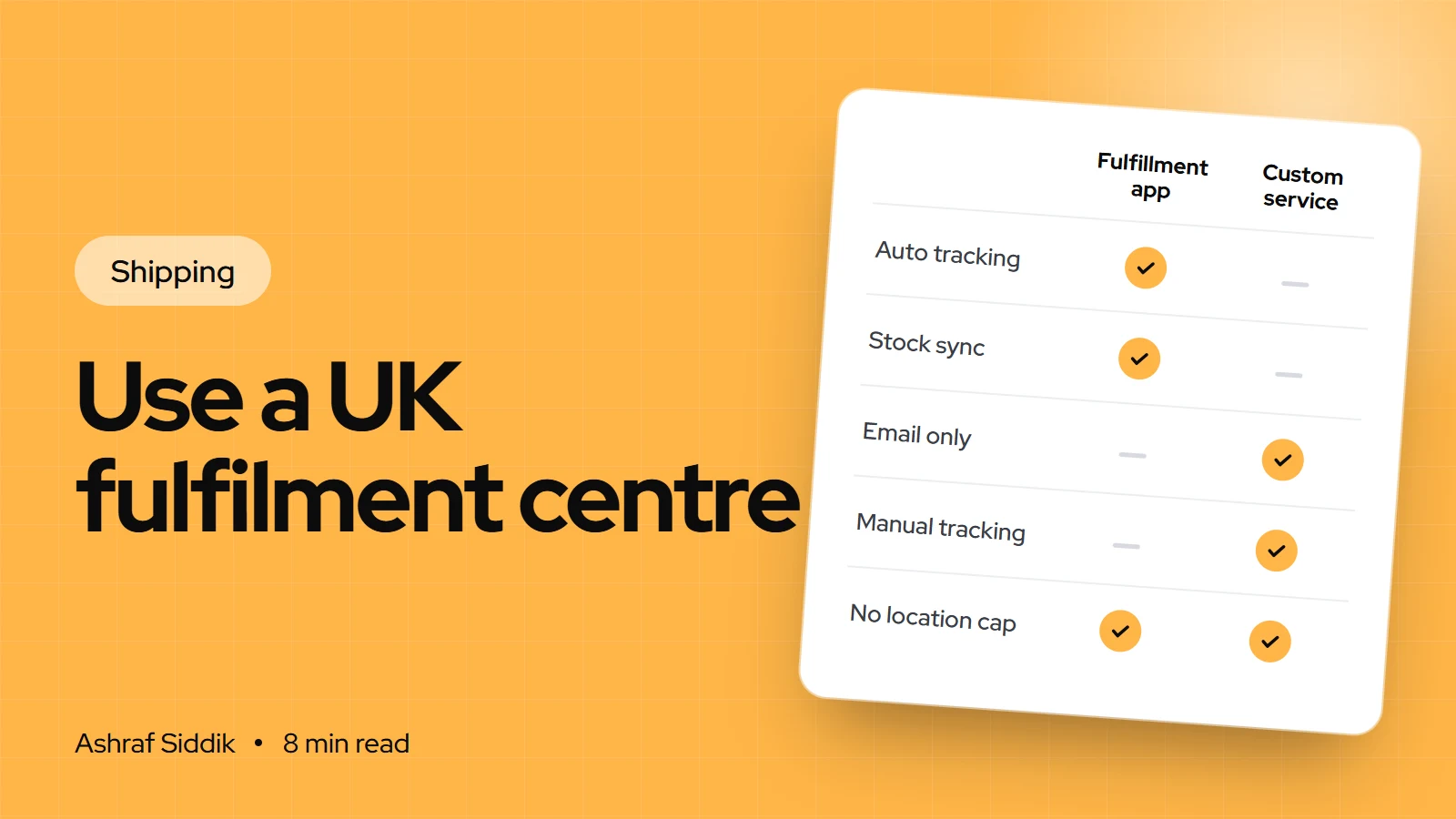
| Connection | How orders reach them | Tracking back | Best for |
|---|---|---|---|
| Fulfillment app | Requested automatically or with one click | Added to the order automatically | Most stores |
| Custom fulfillment service | An email when you mark the order fulfilled | You add it by hand | Small or local warehouses |
| Shopify Fulfillment Network | Through the Fulfillment Network app | Automatic | Stores fulfilling from the US only |
Fulfillment apps are the normal route. The warehouse publishes an app, you install it, and it appears in Shopify as a location. Order status updates as the warehouse works, and tracking lands on the order without you touching it.
Custom fulfillment services suit a warehouse with no app. Shopify emails the order details to them when you mark an order fulfilled, but nothing comes back automatically: you add tracking yourself, or mark the order delivered if there's no tracking number. If a warehouse needs more than email, a developer can build a custom app against Shopify's fulfillment APIs.
Shopify Fulfillment Network connects you with partner 3PLs, but Shopify says it's only for businesses fulfilling out of the United States. A UK store would have to send stock to the US, so for UK customers it rarely fits.
How to choose a UK fulfilment centre
Beyond price, these are the questions I'd want answered in writing before signing:
- Shopify connection. Do they have a Shopify app? Does it sync stock levels both ways, add tracking automatically and handle partial fulfillments?
- Cut-off and carriers. What time must an order arrive to ship the same day, and which carriers and services can you offer customers?
- Cancellations. How fast do they respond to a cancellation request, and do they charge if the order was already picked?
- Returns. Do they receive, inspect and restock returns, and does stock update in Shopify when they do?
- Fees. Receiving, storage per pallet or shelf, pick and pack per order and per extra item, packaging, monthly minimums and any setup charge.
- Packaging and inserts. Can they use your branded boxes, add a card, or pack bundles to your instructions?
- Exit terms. Notice period, and the cost of getting your stock back if you leave.
If your business is based outside the UK
Many non-UK brands use a UK warehouse to deliver faster to British customers. If that's you, HMRC's Fulfilment House Due Diligence Scheme applies to the warehouse. A business must apply if it stores goods that are imported from outside the UK, owned by or stored for a seller established outside the UK, and offered for sale without having been sold in the UK before.
Trading without approval is a criminal offence for the fulfilment house, with a possible £10,000 penalty. Approved businesses appear on a registered list published on GOV.UK, so ask for the warehouse's registration and check it there. This is about the warehouse's obligations, not tax advice for your business, so speak to an adviser about your own VAT position.
Step by step: connecting your fulfilment centre
- Prepare product data. Make sure every variant has a unique SKU and a barcode if the warehouse scans items. Most 3PLs match stock by SKU, and duplicates cause mis-picks.
- Install the warehouse's app. Install it from the Shopify App Store and connect it to your account with the warehouse. It appears in
Settings > Locationsunder App and custom fulfillment locations, and it doesn't count toward your location limit. - Or add a custom fulfillment service. If there's no app, go to
Settings > Shipping and delivery, find the Custom order fulfillment section, clickAdd fulfillment service, enter the warehouse's name and email address, and clickSave. - Assign products. For a custom service, open each product in
Productsand, in the Inventory section, choose the service from theInventory will be stocked atmenu. For an app, follow the app's own product sync. - Send your stock. Book the inbound delivery with the warehouse, using their labeling and packing rules, and check that quantities in Shopify match what they receive.
- Add the location to shipping. If your store only uses the General profile with no rates per location, Shopify adds a fulfillment app to your shipping settings automatically. Otherwise, add the warehouse location to each shipping profile yourself and give it rates.
- Set order routing. If you keep stock in more than one place, go to
Settings > Shipping and delivery, clickOrder routingand set the rules, such as preferring the warehouse and minimizing split fulfillments. - Test. Place a real order, request fulfillment, cancel one test order, and check tracking arrives and the customer email goes out.
Shipping rates when a warehouse ships for you
Once a warehouse ships your orders, checkout rates need to reflect its costs, not the ones you had when packing yourself. A few things change:
- Shopify labels stop applying. Shopify can't sell labels for products stocked in or fulfilled from an app location. The warehouse buys postage on its own accounts and bills you.
- Some apps can supply live rates. Some fulfillment apps let you show the rates they'll charge you at checkout. Ask your provider, and check whether your plan supports app-calculated rates in your setup.
- Flat rates are often simplest. Take the warehouse's postage price for your typical parcel, add packaging, and set flat or order amount rates. My guide to shipping rates and zones walks through the setup.
- Mixed stock can mean split shipments. If some items ship from the warehouse and some from you, the customer may receive two parcels, and on the current shipping system, rates from different locations or profiles can add up.
Day to day: requests, cancellations and refunds
With a fulfillment app, you click Request fulfillment on an order, add an optional note for the warehouse, and choose whether the customer is notified when it ships. With automatic fulfillment on, requests go out as soon as an order is paid. The warehouse accepts or declines, and the result appears on the order timeline.
Cancel request if the warehouse hasn't accepted yet, or Request cancellation if it has, and wait for its answer. Reverting an order to unfulfilled in Shopify doesn't stop the warehouse shipping it.To fulfill an order from your own stock instead, change the order's location to one you manage first, because Mark as fulfilled isn't available on orders assigned to a fulfillment service location. If you do this often, keep some stock at your own location as a backup.
Common mistakes
- Duplicate or missing SKUs, so the warehouse picks the wrong item or can't match stock.
- Forgetting to add the warehouse to custom shipping profiles, so products stocked there have no rates at checkout.
- Keeping old flat rates after the warehouse's postage prices replace yours.
- Refunding before the warehouse confirms a cancellation, then paying for the order and the shipping anyway.
- No returns process, so returned stock sits unrecorded and Shopify shows it as sold.
- Not checking FHDDS approval when you're a non-UK seller storing imported goods.
Fulfilment centre checklist
- Fees, cut-off times, carriers and exit terms agreed in writing.
- Unique SKUs and barcodes on every variant.
- Warehouse app installed, or custom fulfillment service added with the right email.
- Products assigned and stock counts matching after the first delivery.
- Warehouse location included in every shipping profile, with rates.
- Order routing set if you hold stock in more than one place.
- Cancellation and returns routine agreed and tested.
- FHDDS registration checked on GOV.UK, if you're based outside the UK.
- Test orders placed, cancelled and tracked end to end.
Next steps
Get two or three quotes, ask each provider the questions above, and ask for a test account so you can see their Shopify app working before you move stock. If you're still shipping yourself for now, my guide to Shopify shipping for UK stores and the Royal Mail vs Evri vs DPD comparison will help you get the most from in-house fulfillment.
If your warehouse needs a custom integration, or you want a hand checking the setup, I work with UK stores through my UK Shopify development service. Send me your store for a free review to start.
Free tools
Check your own store
Free, no sign-up. Each one runs a part of this guide for you.
Frequently asked questions
Does Shopify have its own fulfilment service in the UK?
Not for UK warehouses. Shopify's Fulfillment Network app connects you with partner 3PLs, but Shopify says it's only available to businesses fulfilling out of the United States. UK stores connect a UK fulfilment centre through its app or as a custom fulfillment service.
How does a fulfilment centre connect to Shopify?
Usually through the warehouse's Shopify app, which receives orders and sends tracking back automatically. If there's no app, you can add it as a custom fulfillment service in Settings > Shipping and delivery, which emails the order details when you mark an order fulfilled.
Do fulfilment centres count toward my Shopify location limit?
No. Apps that stock inventory for you, including third-party logistics services and custom fulfillment services, are treated as locations but don't count toward the limit. Basic, Grow and Advanced allow 10 active locations.
Can I still buy Shopify shipping labels if I use a 3PL?
Not for products stocked in or fulfilled from an app location. The warehouse buys postage on its own carrier accounts and bills you, so your checkout rates should reflect its prices.
Can I cancel an order after requesting fulfillment?
Yes, but you have to ask. If the warehouse hasn't accepted the request, you can cancel it directly. If it has, send a cancellation request and wait for its answer. You can't edit the order or refund items while fulfillment is requested.
What is the Fulfilment House Due Diligence Scheme?
It's an HMRC scheme for UK businesses that store imported goods for sellers established outside the UK. Those fulfilment houses must be approved, and approved businesses are listed on GOV.UK. Check with an adviser for your own situation.
Sources
- Fulfilling orders using a fulfillment service with an app, Shopify Help Center
- Fulfilling orders using custom fulfillment services, Shopify Help Center
- Setting up and managing locations, Shopify Help Center
- Getting started with the Fulfillment Network app, Shopify Help Center
- Buying shipping labels, Shopify Help Center
- Fulfilment House Due Diligence Scheme, GOV.UK
Related services and work

I'm a Shopify developer and CRO specialist. I have built and improved Shopify stores since 2018, completed more than 1,000 projects, and hold a 4.96 average rating across 719 client reviews.
More guides
-
Royal Mail Tracked 24 or Tracked 48: Which Should I Use?
Use Tracked 48 as your standard and Tracked 24 as a paid upgrade. Here is how they differ and how to set both up on Shopify.
-
How to Choose Eco-Friendly Packaging for Your Brand
Good eco friendly packaging protects the product with less material, and makes claims you can back up. Here is how to choose it, word it and set it up in your store.
-
How to Connect Australia Post to Shopify
Australia Post connects to Shopify through a free MyPost Business account, so you can buy labels and show rates in your admin. Here is the setup, step by step.
-
How to Set Up Local Delivery on Shopify
Shopify's built-in local delivery lets nearby customers choose delivery at checkout, at a price you set. Here is how to set it up, price it and run it day to day.