Shopify guideGuide7 min read
Shopify Hydrogen and Headless Commerce Explained
Hydrogen lets developers build a Shopify storefront in React and host it on Oxygen. This guide explains how it works, how it compares with Liquid, and how to tell whether your store needs it.
Key takeaways
- Shopify Hydrogen is Shopify's toolkit for headless storefronts. Its starter template uses React Router 7 and deploys to Oxygen, Shopify's hosting, and there is also a Next.js template that deploys to Vercel.
- Headless means your storefront is a separate code project that talks to Shopify through the Storefront API. Shopify still runs products, cart, checkout and orders.
- Shopify's own docs say a headless storefront costs more to build and run than a theme, and needs developers to maintain it after launch.
- For most stores, a well-built Liquid theme is faster to launch, cheaper to run and easier for the team to edit. Hydrogen pays off when a theme truly can't deliver the experience you need.
- Who it is for
- Brands weighing a headless build
- Time needed
- 10 minutes to read, weeks to build
- What you need
- A clear reason a theme can't work
Most of the Hydrogen projects I'm asked about don't need Hydrogen. The store wants to be faster, or more custom, or to feel like a big brand's site, and someone has suggested headless as the answer. Sometimes it is. More often, a good Liquid theme gets the same result for a fraction of the cost and keeps the theme editor that the marketing team relies on.
This guide explains what Shopify Hydrogen is, how headless commerce works on Shopify, how it compares with Liquid, and how a Hydrogen project starts. Technical details come from shopify.dev and Shopify's Hydrogen listing as I checked them on 7 November 2026. Shopify's docs now cover Hydrogen version 2026-10, and versions 2026-04 and earlier are called "Legacy Hydrogen", so older tutorials may not match.
What headless commerce means on Shopify
A normal Shopify store uses a theme: Liquid files that Shopify renders and hosts, edited in the theme editor. Headless separates the storefront from that backend. You build the storefront yourself in any web framework, and it fetches products, collections, customers and the cart from Shopify's APIs.
Some things stay with Shopify whatever you build. Products, inventory, orders, payments, discounts and international pricing are still managed in your Shopify admin. When a shopper checks out, the storefront hands them to Shopify's checkout.
Shopify suggests considering headless when its themes, apps and sales channels can't deliver the experience you need. Its examples include a storefront that existing tools can't support easily, a frontend stack that doesn't use Liquid, adding commerce to infrastructure you already run, selling on channels Shopify doesn't support out of the box, and content that lives in a separate CMS.
What Shopify Hydrogen is
Hydrogen is Shopify's headless toolkit. It gives developers the commerce pieces, such as a Storefront API client, cart handling and customer accounts, inside a JavaScript framework they already use. The key facts:
- Frameworks. The main starter template runs on React Router 7 in framework mode. A Next.js template, called Vercel Shop, is also available. Hydrogen can be added to other frameworks that run server code, and Shopify names Astro, Nuxt, SvelteKit and SolidStart.
- APIs. Hydrogen covers the Storefront API and the Customer Account API only. Anything that needs the Admin API, such as writing order data, belongs in an app or a backend service.
- No component library. Hydrogen doesn't ship ready-made design components. Your developer builds every part of the interface.
- Server code required. Projects that run only in the browser, or build only static files, don't work with it.
- Price. The Hydrogen channel is free on the Shopify App Store, and Shopify says you can deploy a storefront on Oxygen at no cost.
Oxygen: where Hydrogen storefronts live
Oxygen is Shopify's hosting platform for storefronts. Each Hydrogen storefront in your admin has its own environments, environment variables and deployments, managed under Sales channels > Hydrogen. You can deploy automatically on every push to GitHub, or from your own machine or CI system.
Oxygen environments are private by default. To show the storefront to others, you share a deployment or make the environment public. Development stores and trial-plan stores can't have public environments, so plan the launch on a paid store.
You don't have to use Oxygen. Shopify recommends Vercel for Next.js projects, and its docs cover deploying to Node, Cloudflare Workers and Deno.
Shopify Liquid vs Hydrogen
This is the decision that matters. Both can produce a fast, distinctive store. They differ in who can change it and what it costs to keep running.
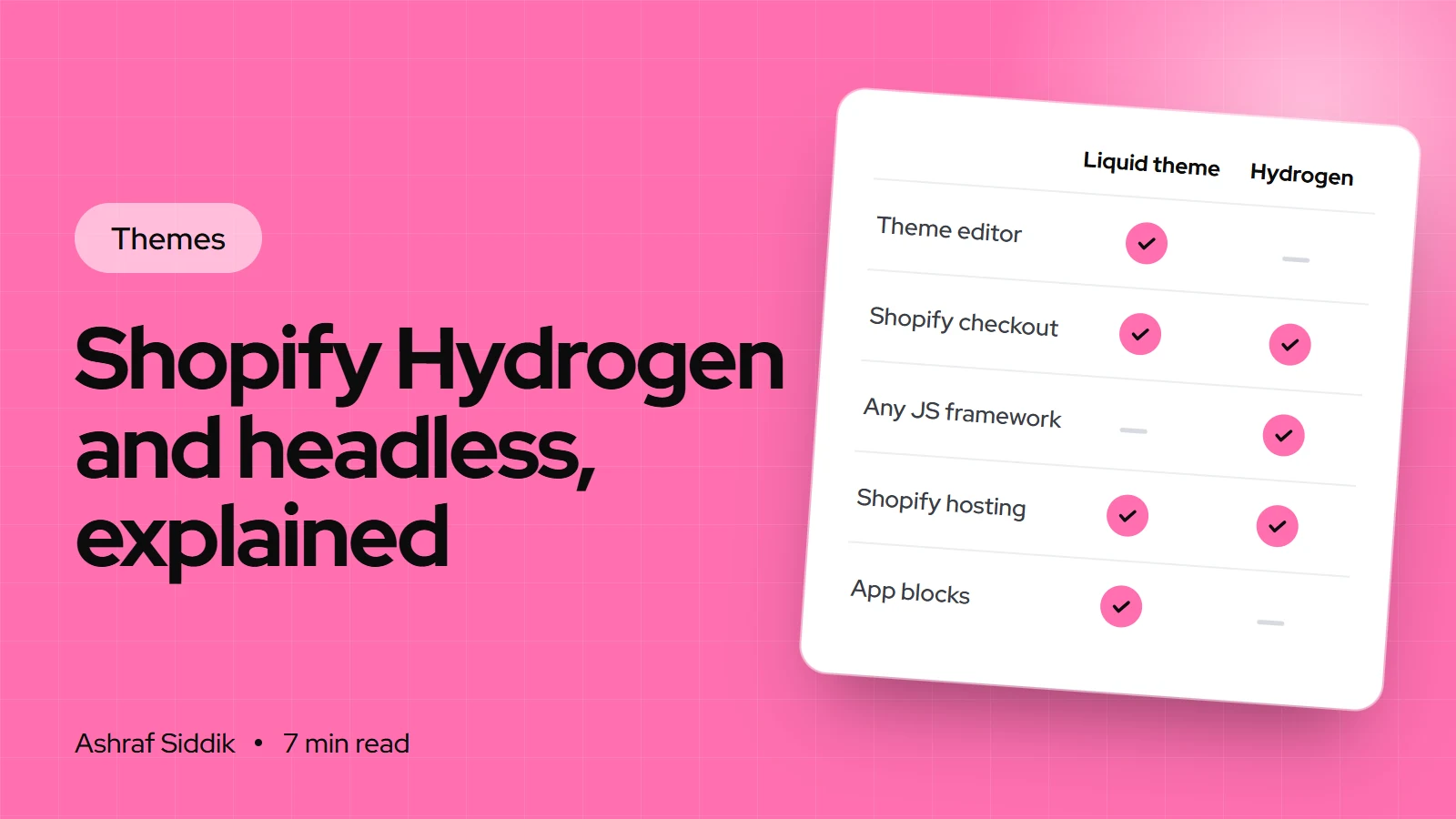
| Aspect | Liquid theme | Hydrogen |
|---|---|---|
| Code | Liquid, HTML, CSS, JavaScript | React or another JS framework |
| Hosting | Included with Shopify | Oxygen, Vercel or your own |
| Editing pages | Theme editor, no code | Developer, or a connected CMS |
| Apps | App blocks and embeds just work | Each app needs its own integration |
| Checkout | Shopify checkout | Shopify checkout |
| Build and running cost | Lower | Higher, by Shopify's own account |
The apps row surprises people most. On a theme, a reviews or loyalty app drops in through an app block. On a headless storefront, that app has to offer an API or headless SDK, and your developer has to build the widget. Check every app you depend on before you commit.
Speed is the other common reason given for headless. A Hydrogen storefront can be very fast, but so can a lean Liquid theme. In my experience the slow Shopify stores are slow because of app scripts, oversized images and heavy sections, and those problems follow you into any stack. Fixing them on the current theme is usually the cheaper first step, and it's the kind of work my speed optimization service covers.
Should your store go headless?
Liquid theme or Hydrogen?
- 1
Is there a specific experience a theme with custom sections can't deliver?
Yes: next questionNo: stay on a Liquid theme
- 2
Do you have, or will you pay for, developers to maintain the storefront after launch?
Yes: next questionNo: stay on a Liquid theme
- 3
Do all the apps you rely on work headless, or can you replace them?
Yes: Hydrogen is a reasonable choiceNo: solve the app gap first
If you answered no anywhere, a custom Liquid theme usually gets you most of the way at a lower cost.
Stores where I'd seriously consider Hydrogen: a brand with a content-heavy site already running on a headless CMS, a store that needs an interactive product builder or configurator a theme can't host well, or a business adding commerce to an existing web app. Stores where I wouldn't: a growing brand with a small team that edits its home page every week.
How a Hydrogen project starts
This is the current flow for the React Router template on Oxygen, from Shopify's docs. It shows what your developer will do, and what access they'll ask you for.
- Create the storefront. In the admin, the developer opens the Hydrogen channel's new storefront screen with the React Router template, installing the Hydrogen channel if asked, and names the storefront.
- Connect GitHub. Under deployment setup, they keep continuous deployment on, connect GitHub and create a new repository. Shopify creates the API tokens, environments and a GitHub Actions workflow that deploys to Oxygen.
- Set up locally. They clone the repository and run
npm install, using Node.js 22 or 24. - Link the store.
npx shopify hydrogen linkconnects the project to the storefront, andnpx shopify hydrogen env pullcopies its environment variables into a local.envfile. - Develop.
npm run devstarts a local server athttp://localhost:5173. The template includes home, collection, product, search and cart pages to build on. - Deploy. Every push to the watched branch deploys to Oxygen automatically.
Before the template is connected, it reads demo data from mock.shop, Shopify's sample store, so a developer can start before your products are ready.
Settings > Metafields and metaobjects, tick Storefronts, or your developer won't be able to show that data.Hiring a Shopify Hydrogen developer
Hydrogen development is React development with Shopify knowledge on top. When you brief a developer or agency, ask about:
- Recent Hydrogen work on the current React Router version, not only legacy Hydrogen.
- Content editing. How your team will change pages without a developer: a headless CMS, Shopify metaobjects or something else.
- Apps. How each app you use today will work headless, and what replaces the ones that won't.
- Analytics and consent. In the Next.js template these are opt-in, so confirm they're planned.
- Who maintains it. Framework updates, Hydrogen version changes and API versions all need attention after launch.
Common mistakes with headless Shopify
- Going headless for speed alone. Fix app scripts and images on the current theme first.
- Forgetting the marketing team. Losing the theme editor means every banner change goes through a developer unless a CMS is planned.
- Assuming apps will work. Theme app blocks and embeds don't exist on a headless storefront.
- Budgeting for launch only. Shopify is clear that headless costs more to run, not just to build.
- Following outdated tutorials. Legacy Hydrogen guides use different structure and commands.
Headless readiness checklist
- Write down the exact experience a theme can't deliver.
- List every app and confirm each one has a headless option.
- Decide how non-developers will edit content.
- Budget for ongoing development, not just the build.
- Plan hosting: Oxygen, Vercel or your own.
- Tick
Storefrontsaccess on every metafield the storefront needs. - Launch on a paid plan store, since trial and development stores can't make environments public.
Next steps
If you're weighing headless against a custom theme, my comparison of a Shopify theme vs a custom build sets out the costs side by side, and Shopify Liquid basics explains what the theme route involves. Most stores I review are better served by a strong Liquid build, which my Shopify development service handles from $300. Headless builds get their own scope and a fixed quote after a free review.
Free tools
Check your own store
Free, no sign-up. Each one runs a part of this guide for you.
Frequently asked questions
What is Shopify Hydrogen?
Hydrogen is Shopify's toolkit for building headless storefronts. Its main starter template uses React Router 7 and deploys to Oxygen, Shopify's hosting, and a Next.js template deploys to Vercel. It covers the Storefront API and Customer Account API.
Is Shopify Hydrogen free?
The Hydrogen channel is listed as free on the Shopify App Store, and Shopify says you can deploy a headless storefront on Oxygen at no cost. The real cost is development: building and maintaining a custom React storefront takes developer time.
What is the difference between Shopify Liquid and Hydrogen?
Liquid themes are rendered and hosted by Shopify and edited in the theme editor. Hydrogen storefronts are separate code projects in a JavaScript framework that fetch data through Shopify's APIs. Both use Shopify checkout, but Hydrogen needs developers for most changes and app integrations.
Do Shopify apps work with Hydrogen?
Not automatically. Theme apps work through app blocks and embeds, which only exist in themes. On a headless storefront, an app needs an API or headless SDK, and your developer builds the interface for it.
Do I need Shopify Plus for Hydrogen?
Shopify's Hydrogen docs and listing don't limit it to Plus. Note that development stores and trial-plan stores can't make Oxygen environments public, so a public launch needs a paid store.
Is headless faster than a Shopify theme?
It can be, but it isn't automatic. Most slow Shopify stores are slowed by app scripts, large images and heavy sections, and those problems carry into any stack. Fixing them on the current theme is usually the cheaper first step.
Sources
- Hydrogen, Shopify.dev
- About headless commerce, Shopify.dev
- Deploy a template, Shopify.dev
- Deploy your storefront, Shopify.dev
- Hydrogen, Shopify App Store
- Creating custom metafield definitions, Shopify Help Center
Related services and work

I'm a Shopify developer and CRO specialist. I have built and improved Shopify stores since 2018, completed more than 1,000 projects, and hold a 4.96 average rating across 719 client reviews.
More guides
-
Online Store 2.0 Sections Explained
Online Store 2.0 is the theme architecture behind every current Shopify theme. This guide explains how its templates, sections and blocks work, how to check your theme and how to move from a vintage one.
-
How to Set Up Product Filters in Shopify
Good filters help shoppers find the right product in seconds, and bad product data breaks them. This guide shows how to set up Shopify product filters properly, from data cleanup to theme settings.
-
How to Find Out What Theme a Shopify Store Uses
Every Shopify store names its theme in the page code. Here is where to look, how to read what you find, and what it means for your own theme choice.
-
How to Customize the Dawn Theme Without Code
Dawn looks plain only when it keeps its default settings. This guide shows how to customize the Shopify Dawn theme area by area in the theme editor, with the real setting names from version 16.1.1.