CompareComparison10 min read
Shopify vs Squarespace: Which Is Better for Selling Online?
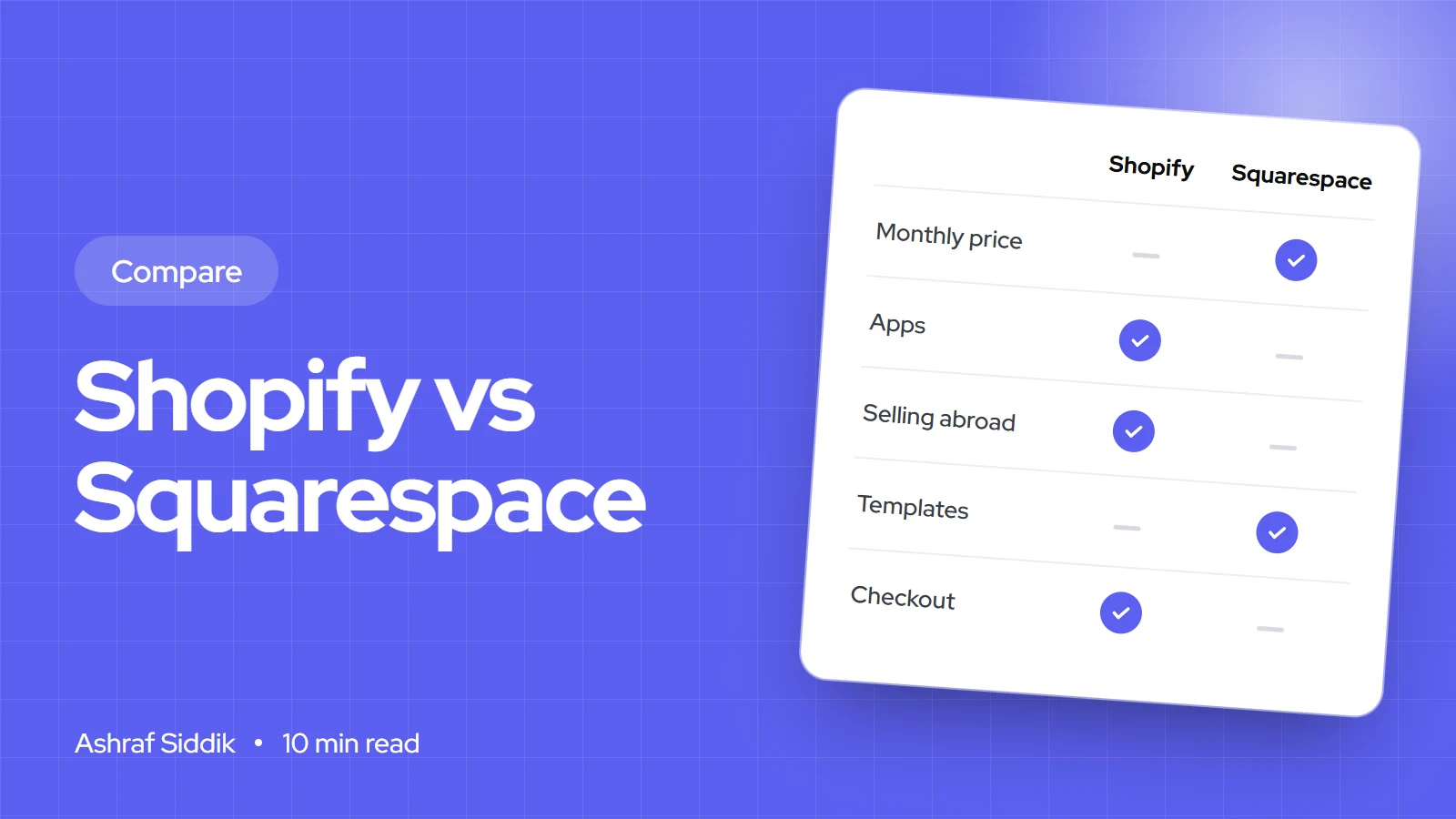
Squarespace is the simpler, cheaper way to sell a few products from a beautiful site. Shopify costs a little more and removes most of the limits. Here is where the line falls, with real prices, fees and a worked example.
Key takeaways
- Squarespace is the simpler, cheaper choice for a beautiful site with a small catalogue. Shopify costs a little more and removes most limits on what, where and how you sell.
- Squarespace's cheapest plan adds a 2% fee to every online sale. At a few thousand dollars a month, that fee costs more than the difference between the plans.
- Card processing is the biggest cost on both platforms, so the plan price is rarely what decides it.
- If you sell in more than one country, need wholesale or point of sale, or depend on apps, Shopify is the safer long-term choice.
- Who it is for
- Founders choosing a platform, and Squarespace sellers thinking about a move
- Time needed
- About 10 minutes to read
- What you need
- Your product count, expected monthly sales and the countries you sell to
I build Shopify stores for a living, so you should know where I stand before you read this. I have also moved stores off Squarespace, and told a few business owners not to move at all, because Squarespace was doing exactly what they needed. This comparison is about which platform fits which kind of store, not which one is "best".
Prices and fees below come from both companies' US pricing pages as I checked them on 6 November 2026. Both change their plans from time to time, so check the pages on the day you sign up.
The short answer
| Your situation | Better fit | Why |
|---|---|---|
| A portfolio, studio or service site that also sells a few products | Squarespace | Strong templates, one simple editor, everything in one plan |
| A store where products are the main business | Shopify | Built around catalogue, checkout and order management |
| Selling in several countries or currencies | Shopify | Shopify Markets handles prices, languages and domains per country |
| Wholesale, a physical shop or marketplaces as well as your site | Shopify | B2B, point of sale and sales channels connect to one stock count |
| Under a few hundred dollars a month in sales, and that suits you | Squarespace | Lower plan price, and fewer moving parts to look after |
What each platform costs
Both platforms charge less per month if you pay for a year upfront. Squarespace calls its plans Basic, Core and Advanced. Shopify's are Basic, Grow and Advanced, with Shopify Plus above them for large brands.
| Squarespace plan | Billed monthly | Billed yearly | Fee on online store sales |
|---|---|---|---|
| Basic | $19 a month | $12 a month | 2% |
| Core | $27 a month | $17 a month | 0% |
| Advanced | $36 a month | $25 a month | 0% |
| Shopify plan | Billed monthly | Billed yearly | Fee if you don't use Shopify Payments |
|---|---|---|---|
| Basic | $25 a month | $19 a month | 2% |
| Grow | $65 a month | $49 a month | 1% |
| Advanced | $399 a month | $299 a month | 0.6% |
Squarespace gives you a 14-day free trial. Shopify offered new stores 3 days free, then $1 a month for three months, when I checked. Squarespace's yearly plans also include a free domain for the first year. With Shopify you buy or connect your own.
On the surface, Squarespace looks cheaper at every level. The plan price is the smallest part of the bill once a store starts selling, though, so the next section matters more.
Transaction and card fees
There are two kinds of fee to keep apart:
- Card processing is what the payment provider charges to take a card payment, usually a percentage plus a small fixed amount per order. You pay it on any platform.
- Platform transaction fees are what the platform adds on top. Squarespace adds 2% on its Basic plan and nothing on Core or Advanced. Shopify adds nothing if you use Shopify Payments, and 2%, 1% or 0.6% if you use another provider.
With Shopify Payments, the standard US online card rates Shopify has quoted are 2.9% + 30¢ on Basic, 2.7% + 30¢ on Grow and 2.5% + 30¢ on Advanced. Squarespace takes payments through its own Squarespace Payments, Stripe or PayPal, and its pricing page doesn't list their card rates, so check them in your provider's dashboard.
Monthly cost for a store selling $5,000 from 100 orders
- Squarespace Basic$287$12 plan, $100 platform fee (2%), $175 card processing.
- Squarespace Core$192$17 plan, no platform fee, $175 card processing.
- Shopify Basic$194$19 plan, no platform fee with Shopify Payments, $175 card processing.
- Shopify Grow$214$49 plan, $165 card processing at the lower Grow rate.
Two things stand out. First, Squarespace Basic is the most expensive option in this example, because its 2% fee is charged on every sale. Once you sell more than about $250 a month, Core costs less than Basic. Second, Squarespace Core and Shopify Basic cost almost the same. At this size, the platform decision should come down to what each one lets you do, not the price.
What you can sell
Both platforms sell physical products, digital downloads, services and subscriptions. Squarespace includes subscriptions on every plan. Shopify handles them through apps, including Shopify's own free Subscriptions app.
The differences show up as a catalogue grows:
- Products and variants. Shopify is built for large catalogues, with up to 2,048 variants per product, bulk editing, metafields for extra product data and CSV import and export. Squarespace is comfortable with tens or a few hundred products, and gets harder to manage beyond that.
- Selling in person. Shopify POS runs a physical shop, pop-up or market stall from the same stock and customer list as your website. If in-person sales matter, check that the other platform supports them in your country before you commit.
- Wholesale. Shopify has built-in B2B features, fullest on Shopify Plus, and wholesale apps on every plan, for trade prices, minimum orders and payment terms. Squarespace has no wholesale tools of its own.
- Other channels. Shopify connects your catalogue to Google, Meta, TikTok, marketplaces and more, all from one stock count. Squarespace's channel options are narrower.
Checkout and payments
Checkout is where most sales are won or lost, and it is Shopify's strongest feature. Shop Pay saves a shopper's details across every Shopify store, so returning shoppers can pay in a couple of taps, and Shopify keeps refining its checkout across millions of stores. You can add upsells, custom fields and branding to it, with more control on Shopify Plus.
Squarespace's checkout is clean and supports the main options, including card payments, Apple Pay and PayPal through its payment providers. It is perfectly good for a small store. You simply have fewer ways to change it, and fewer of your shoppers will already have saved their details.
Both platforms include abandoned cart emails on every plan, so neither leaves you without that basic recovery tool.
Apps and integrations
This is the biggest practical gap. The Shopify App Store has an app for almost any job: reviews, bundles, loyalty, subscriptions, product options, shipping, accounting and stock control. When an app doesn't exist, a developer can build one with Shopify's APIs.
Squarespace has a much smaller set of extensions. Its Core and Advanced plans add API access for custom integrations, which covers order and stock sync with other systems, but you will usually need a developer for anything beyond the built-in features.
Apps are also a cost on Shopify. Many charge a monthly fee, and a store can easily spend more on apps than on its plan. It pays to review them every few months and remove what you no longer use.
Design and editing
Squarespace is known for its templates, and they deserve the reputation. The editor lets you drag sections and blocks into place and see the result straight away, which suits creative businesses that care most about how the site looks.
Shopify themes are built from sections and blocks too, and the theme editor lets you change most layouts without code. The difference is depth: a Shopify theme can be changed in code, without limits, by any Shopify developer. That matters once you want a custom product page, a size guide on every product or a layout no template offers.
SEO and speed
Both platforms handle the basics well: editable titles and meta descriptions, clean URLs, automatic sitemaps, SSL and mobile-friendly templates. Neither will stop you ranking. Content, product pages and links decide that.
A few details differ. Shopify fixes some URL patterns, such as /products/ and /collections/, which you can't change. Squarespace gives you more freedom over URL structure. Shopify has far more SEO apps and more control over structured data through themes and apps. On speed, both can be fast or slow. On Shopify, the usual cause of a slow store is too many apps and oversized images, not the platform.
Selling to other countries
If you sell abroad, Shopify is clearly ahead. Shopify Markets lets one store show local currencies, prices, languages and domains for each country, and can collect duties and import taxes at checkout where your setup supports it. You manage it all from one admin.
Squarespace calculates tax rates automatically for over 100 countries on its Core and Advanced plans, for a small per-order fee (0.15% on Core and 0.05% on Advanced, up to $0.99 an order). Its options for local currencies and languages are more limited, so check it supports the markets you need before you build on it.
Signs a store has outgrown Squarespace
- You need an app that doesn't exist on Squarespace, such as wholesale pricing, product bundles, a loyalty programme or complex product options.
- You sell in several countries and want local currencies and languages on one site.
- Your catalogue is growing and managing products, variants and stock has become slow.
- You sell in other places, like a shop, markets or marketplaces, and keep stock in step by hand.
- You want to test and improve checkout, and the built-in options no longer stretch far enough.
If none of these apply, staying on Squarespace is often the right call. Moving costs time and money, and a platform change won't fix a store that isn't selling for other reasons.
How to decide in three questions
Squarespace or Shopify?
- 1
Are products the main part of your business, rather than an extra?
Yes: lean towards ShopifyNo: next question
- 2
Do you need to sell in several countries, in person or to trade customers?
Yes: ShopifyNo: next question
- 3
Do you need features that only an app or custom code can add?
Yes: ShopifyNo: Squarespace Core will serve you well
If you start on Squarespace and outgrow it, you can move later. Plan your URLs and redirects early and the move is much easier.
Moving from Squarespace to Shopify
A move is very manageable if it is planned. These are the steps I follow:
- Export your products. Squarespace exports physical products as a CSV file. Clean it up and map it to Shopify's product CSV, including variants, images and SEO titles.
- Move your content. Pages and blog posts usually need rebuilding in the new theme. This is a good moment to drop pages nobody visits.
- Bring customers and orders across. Customer lists move by CSV. Order history needs an app or a developer if you want to keep it in Shopify.
- Set up redirects. Map every old URL to its new one, so search rankings and old links carry over. Shopify's URL redirects handle this.
- Move or connect your domain. Point the domain to Shopify once the new store is ready and tested, and keep email settings intact.
- Test, launch, then watch. Place real test orders, check every redirect and keep an eye on Search Console for a few weeks after launch.
Most of the risk sits in redirects and product data. Get those right and customers and search engines barely notice the move, apart from a better store.
Free tools
Check your own store
Free, no sign-up. Each one runs a part of this guide for you.
Frequently asked questions
Is Shopify better than Squarespace for ecommerce?
For stores where products are the main business, yes. Shopify gives you more control over checkout, far more apps, better tools for large catalogues and much stronger options for selling abroad, in person and wholesale. Squarespace is the better fit when the website itself is the main thing and the shop is a smaller part of it.
Is Squarespace cheaper than Shopify?
On the plan price, yes: Squarespace plans start lower. But Squarespace Basic adds a 2% fee to every online sale, so once you sell more than about $250 a month, Core is the cheaper Squarespace plan. At that level, Squarespace Core and Shopify Basic cost about the same once card processing is included.
Does Squarespace charge transaction fees?
Only on the Basic plan, which adds 2% to online store sales. Core and Advanced have no platform transaction fee, although your payment provider still charges its own card processing fee on every order. Digital content and memberships carry separate fees: 7% on Basic, 5% on Core and none on Advanced.
Can I move from Squarespace to Shopify without losing my Google rankings?
Yes, if you plan the redirects. Map every old URL to its new Shopify URL before launch, keep page titles and content close to the originals, and check Search Console in the weeks after the switch. Most ranking losses after a move come from missing redirects, not from the new platform.
Which is better for a small store with only a few products?
If the shop is a small part of a creative or service business, Squarespace Core is simpler and does the job well. If the products are the business, even a small catalogue is usually better on Shopify, because you will not need to move platforms as you grow.
Can I keep my Squarespace site and sell with Shopify?
Yes. Shopify’s Buy Button sales channel adds products and a cart to another website, with checkout handled by Shopify. It works, but you look after two systems, so most growing stores eventually move the whole site to one platform.
Sources
- Pricing plans and features, Squarespace
- Pricing (US), Shopify
- Pricing (UK), Shopify
Related services and work

I'm a Shopify developer and CRO specialist. I have built and improved Shopify stores since 2018, completed more than 1,000 projects, and hold a 4.96 average rating across 719 client reviews.
More guides
-
Shopify vs Lightspeed for Retail and Online Selling
Lightspeed starts from the till and Shopify starts from the online store. Here is what each costs for a shop with a website, where each is stronger, and how to choose.
-
Shopify vs Wix for Selling Online: An Honest Comparison
Wix and Shopify cost almost the same for a small store, so price shouldn't decide it. Here is where each one is stronger, what each really costs, and how to pick.
-
Shopify vs Squarespace vs Wix: Pick the Right Builder for Your Store
All three can run a small store for about the same monthly cost. What separates them is what your website is for, and how far you plan to grow.
-
Shopify vs EKM for UK Online Shops: Which Should You Use?
EKM now sells one managed plan with a UK team behind it. Shopify is cheaper software where you choose who helps you.