Shopify guideGuide8 min read
USPS and UPS Shipping on Shopify: Rates, Labels and Pickups
Shopify lets you show USPS and UPS rates at checkout and buy discounted labels from the same admin. Here is how to set both up, which plan you need for your own carrier account, and the mistakes that make rates wrong.
Key takeaways
- Shopify Shipping sells USPS and UPS labels at discounted rates on every plan, and can show USPS and UPS calculated rates at checkout from a US location. The discount varies by plan.
- Showing rates from your own UPS or USPS account needs third-party carrier-calculated shipping: included on Advanced and Plus, and available on Grow for a monthly fee or with yearly billing.
- USPS labels bought in Shopify include coverage of up to $100 on Ground Advantage, Priority Mail and Priority Mail Express. USPS and UPS pickups from a US location are free.
- Most rate problems come from missing product weights or a wrong default package, not from the carrier.
- Who it is for
- US stores shipping with USPS or UPS
- Time needed
- 1 to 2 hours to set up
- What you need
- Product weights and your box sizes
Every shipped order has two prices: what the customer paid for shipping at checkout, and what you paid for the label. When those two drift apart, a store quietly loses money on every parcel or overcharges and loses the sale. Setting up USPS and UPS properly in Shopify is mostly about keeping those two numbers close.
This guide covers both sides for US stores: the rates customers see at checkout, and the labels you buy afterwards. Service names, limits and plan rules come from Shopify's help center and Shopify's shipping page, as checked on 7 November 2026. Carrier rates change often, so check the live rates in your admin.
Two ways to use USPS and UPS
There are two separate things you can connect, and stores often mix them up:
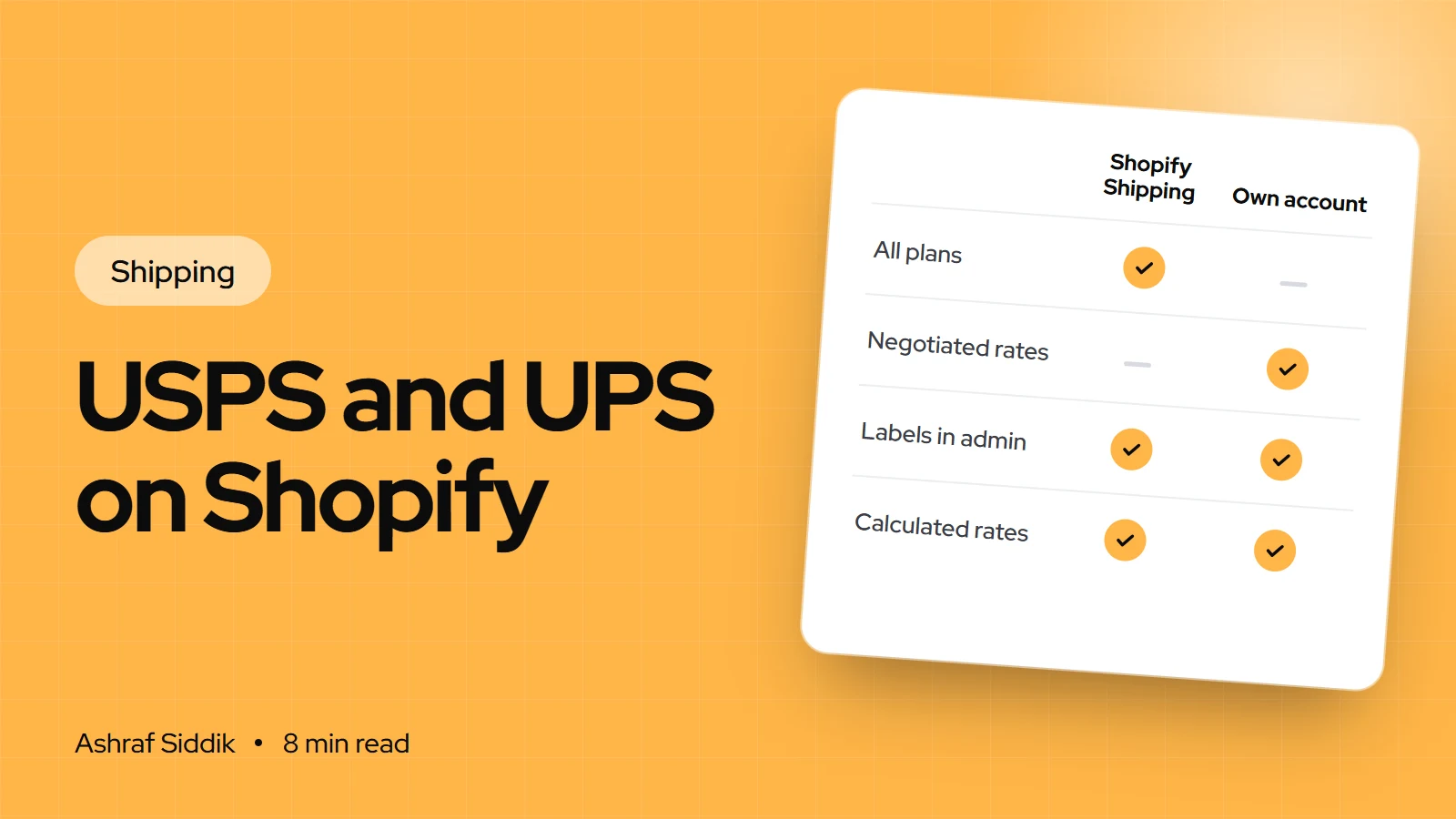
- Shopify Shipping. You buy labels through Shopify's own accounts with USPS, UPS, DHL and others, at discounted rates, and pay on your Shopify bill. Shopify can also show these carriers' calculated rates at checkout. This is built in on every plan.
- Your own carrier account. You connect a UPS or USPS account so checkout shows your account's rates, such as rates you negotiated with UPS. This needs third-party carrier-calculated shipping.
| Route | Plans | Checkout rates | Labels |
|---|---|---|---|
| Shopify Shipping | All plans | USPS, UPS, DHL calculated | Bought in Shopify |
| Own UPS or USPS account | Advanced, Plus | Your account's rates | Your account or Shopify |
| Own account on Grow | Grow, with add-on | Your account's rates | Your account or Shopify |
For most small and mid-size stores, Shopify Shipping is the right starting point. Your own account only pays off when you have negotiated UPS rates that beat Shopify's discount, which usually needs real volume. If you're weighing a plan upgrade for this, Shopify Grow vs Advanced covers what else changes.
USPS services you can use in Shopify
These are the USPS services Shopify Shipping lists for US locations, with the delivery times Shopify quotes:
| USPS service | Delivery time | Best for |
|---|---|---|
| Ground Advantage | 2 to 5 business days | Most small parcels |
| Priority Mail | 1 to 3 business days | Faster, heavier or cubic parcels |
| Priority Mail Express | 1 to 2 business days | Urgent orders, money-back guarantee |
| First-Class Mail | 1 to 5 business days | Large envelopes |
| Media Mail | 2 to 10 business days | Books, music and other media |
Domestic USPS parcels can weigh up to 70 lb, with a combined length and girth of up to 108 inches. For international orders, Shopify offers First-Class Package International Service, Priority Mail International (6 to 10 business days) and Priority Mail Express International (3 to 5 business days).
Cubic pricing is the USPS discount most stores never use. Small, heavy parcels on Priority Mail (up to 20 lb and 0.5 cubic feet) and Ground Advantage (up to 20 lb and 1 cubic foot) are priced by volume instead of weight. Volume is length × width × height in inches, divided by 1,728. Packages can be up to 18 inches on any side, and rolls and tubes don't qualify. If you sell dense products in small boxes, check cubic rates when you buy labels.
A few extras have fixed prices. Signature confirmation adds $2.60 to Ground Advantage, Priority Mail, Parcel Select Ground and Media Mail, and Priority Mail Express includes it. USPS pickups are free during regular mail hours, but choosing a specific pickup time costs $24.
UPS in Shopify
UPS labels through Shopify Shipping are for domestic shipments within the US (or within Canada, from a Canadian location), and not to Puerto Rico. From the US you can schedule free pickups from your location. UPS offers several delivery speeds, and you see the available services and prices when you buy a label.
If you already have negotiated UPS rates, connect your own account to show them at checkout. A few UPS services aren't supported in Shopify: UPS SurePost, Mail Innovations and Simple Rate. Negotiated rates can take up to three business days to appear in checkout after you connect.
Step by step: set up USPS and UPS rates at checkout
- Add accurate weights. Open each product, check that Physical product is on in the Shipping section and enter the weight as packed, not the bare product. Calculated rates use the weight, so a missing weight means a wrong rate.
- Set up your packages. Go to
Settings > Shipping and delivery. In the Packages section, click Add package and enter the name, type (box, envelope, soft pack, flat rate or a carrier package from USPS or UPS), dimensions and weight. Mark the box you use most as the store default. - Open the shipping profile. Still in
Settings > Shipping and delivery, click your profile under Shipping profiles. - Add a calculated option. In your domestic zone, click Add shipping option and set Rate type to Carrier or app calculated.
- Choose carriers and services. Click Choose carrier and apps, pick USPS or UPS, and tick only the services you want to offer. Two or three choices, such as Ground Advantage and Priority Mail, are easier for a customer to pick from than a list of eight.
- Add a handling fee if needed. You can add a percentage, a flat amount or both. The percentage applies first: a $5.00 rate with a 50% markup and a $1.00 flat fee costs the customer $8.50. Enter a negative value to discount shipping instead.
- Click Done, then Save, and place a test order to a few ZIP codes to see the rates customers get.
Connecting your own UPS or USPS account
Check your plan first: your store needs Advanced or Plus, or Grow with the add-on. Then:
- Open carrier accounts. Go to
Settings > Shipping and delivery, click Carrier accounts, then Connect account. - For UPS: click UPS, log in to UPS when redirected, enter your Account/Shipper number and click Submit.
- For USPS: click USPS, then choose USPS commercial rates or USPS retail rates and save. Commercial rates are lower and are the default. Retail rates are higher, which some stores use to cover packing costs.
- Add the carrier to a zone as in the steps above, using Carrier or app calculated.
Buying labels and scheduling pickups
- Open the order. Go to
Orders, open an unfulfilled order and click Create shipping label. - Check items and weight. Adjust item weights with Edit weight and save them to the product so the next label is right. For international orders, click Edit customs information and add the country of origin and HS code.
- Pick the package and service. Select the package, confirm Total weight (with package), then choose a service. Click All to see every eligible option, not only your preferred ones.
- Add extras. Add signature confirmation or extra insurance if the order needs it.
- Set the shipping date and tick Send shipping information to customers, then click Buy shipping label and print.
- Book the pickup. Right after buying a USPS label, use Schedule USPS pickup in the Package pickup section, or open a fulfilled order and choose Schedule pickup from the menu.
Shipping a stack of USPS parcels? Create a SCAN form so USPS accepts them with one scan: Orders > More actions > Create manifests, choose the location, then Create manifest and Print manifest. Labels need the same origin and shipping date, and must be bought by 9:00 pm local time to join that day's manifest.
Insurance and claims
USPS labels bought in Shopify include coverage of up to $100 on Ground Advantage, Priority Mail and Priority Mail Express, and up to $200 on Priority Mail International and Priority Mail Express International. Shopify's shipping page also lists up to $200 of insurance at no extra cost on every order for stores on Grow, Advanced or Plus with Shopify Payments activated. You can add more cover when you buy a label. USPS claims are filed with USPS online between 7 and 60 days after shipping.
Which setup fits your store
USPS and UPS on Shopify: what to set up
- 1
Do you have negotiated UPS or USPS rates that beat Shopify's label prices?
Yes: connect your account (Advanced, Plus or Grow add-on)No: next question
- 2
Do your order weights and sizes vary a lot?
Yes: Shopify Shipping calculated ratesNo: next question
- 3
Are most orders a similar size and weight?
Yes: flat rates, with Shopify Shipping labelsNo: calculated rates
Whichever you choose, compare checkout income with label spend each month. The gap tells you whether the setup works.
Common mistakes
- Products with no weight. Calculated rates fall back to the package weight and come out far too low.
- Offering every service. Long lists of rates slow the checkout down. Offer an economy option and a fast one.
- Wrong shipping date on labels. The date prints on the label, and the post office can refuse a parcel brought in on a different day.
- Voiding First-Class Mail labels. They can't be voided and aren't refundable.
- Ignoring cubic pricing for small, dense parcels.
- Shipping restricted goods through Shopify. HAZMAT and USPS-prohibited items aren't supported and must go directly through USPS.
USPS and UPS setup checklist
- Every product has a packed weight.
- Packages saved, with the right store default.
- Calculated or flat rates set per zone, with two or three services.
- Handling fee set only if packing costs need covering.
- Own account connected only if your rates beat Shopify's.
- Test checkout to near and far ZIP codes.
- Pickups and SCAN forms used for busy days.
- Monthly check of shipping charged against label spend.
Next steps
Start with weights and packages, because every other number depends on them. Then switch on calculated rates for one zone and compare a week of label costs with what customers paid. Run your numbers through the profit margin calculator to see what shipping does to each order. If you want to offer faster delivery as well, see how to offer next-day and named-day delivery, and for smaller bills, how to reduce shipping costs.
If your rates still don't add up, I can check your setup for free as part of a store review. I work with US stores as a Shopify developer for the USA.
Free tools
Check your own store
Free, no sign-up. Each one runs a part of this guide for you.
Frequently asked questions
Does Shopify work with USPS?
Yes. From a US location, Shopify Shipping sells discounted USPS labels on every plan, including Ground Advantage, Priority Mail, Priority Mail Express, First-Class Mail and Media Mail, and can show USPS calculated rates at checkout. You can also connect your own USPS account on Advanced or Plus, or on Grow with an add-on.
Can I use my own UPS account with Shopify?
Yes, through third-party carrier-calculated shipping. It's included on Advanced and Plus, and Grow stores can add it for a monthly fee or by switching to yearly billing. Connect the account under Settings > Shipping and delivery > Carrier accounts.
Are USPS pickups free with Shopify?
Yes, during regular mail hours. You can schedule one right after buying a USPS label or from a fulfilled order. Choosing a specific time of day costs $24, according to Shopify's help center.
Why are my Shopify shipping rates wrong at checkout?
Usually because products have no weight, or the store default package is the wrong size or weight. Calculated rates use product weight plus package details, so check both before you blame the carrier.
Does Shopify include shipping insurance on USPS labels?
USPS labels include coverage of up to $100 on Ground Advantage, Priority Mail and Priority Mail Express, and up to $200 on the two Priority international services. Shopify also lists up to $200 of insurance on every order for Grow, Advanced and Plus stores using Shopify Payments.
What is USPS cubic pricing on Shopify?
A USPS discount that prices small, heavy parcels by volume instead of weight. It applies to Priority Mail up to 20 lb and 0.5 cubic feet, and Ground Advantage up to 20 lb and 1 cubic foot, with no side over 18 inches.
Sources
- Shipping with USPS, Shopify Help Center
- Shipping with UPS, Shopify Help Center
- Setting up carrier-calculated shipping rates, Shopify Help Center
- Activating calculated shipping with UPS, Shopify Help Center
- Buying shipping labels, Shopify Help Center
- Shopify Shipping, Shopify
Related services and work

I'm a Shopify developer and CRO specialist. I have built and improved Shopify stores since 2018, completed more than 1,000 projects, and hold a 4.96 average rating across 719 client reviews.
More guides
-
How to Set Up Shipping Rates and Zones in Shopify
Shopify gives every new store shipping rates it didn't choose. This guide shows how to replace them with zones and rates that fit your products, step by step.
-
How Do I Print Shipping Labels from Shopify in the UK?
You can buy and print a Royal Mail, DPD or Evri label from any order in a couple of minutes. Here are the steps, the printers that work, and the rules to know.
-
How Do I Ship to the Channel Islands and the Highlands?
The Channel Islands are an export for VAT; the Highlands are just a costly UK postcode. Here is how to handle both on a Shopify store.
-
How to Reduce Shipping Costs for a Small Shopify Store
Small stores usually overpay for shipping in three places: the box, the carrier and the checkout rate. Here is how to find the gap and close it, with the Shopify settings and UK carrier limits that matter.